

Buy a second-hand laptop only after matching the exact machine to your work, checking its condition and confirming a usable software setup. For a Windows laptop, verify operating-system eligibility separately from a hardware test. Include essential repairs, the correct charger and collection in the price. Pause if specifications, ownership restrictions or an important fault cannot be resolved before payment.
A laptop that looks like a bargain can still be the wrong machine for your course, your work or the software you need. The processor badge is not a personality trait. It needs to do a job.
If you are a student buying for assignments, or a young professional looking for an affordable work machine, start with that job. Then assess the actual device, not a polished listing or the price it carried when new.
This guide focuses on used Windows laptops. I checked Microsoft's requirements and lifecycle guidance, Dell's official diagnostic instructions and ShipdeHop's current product pages on 8 November 2026. It is a purchasing framework, not a hands-on review or certification of any listing.
Write the job before you shortlist the laptop
List the applications you need, the sort of files you use and whether you must carry the laptop regularly. A writing-and-meetings machine is not automatically an editing workstation because both can open a browser.
Use the current requirements from the publishers of your actual applications. Do not borrow a universal RAM number from a shopping list and assume it fits everything. Storage space, display needs and accessory connections also belong in the decision.
Identify the feature you cannot compromise on. That might be a working webcam, a particular connection for a classroom projector or enough usable battery time for your own routine. Separate that requirement from preferences such as colour.
A seller can offer a well-kept machine that is still unsuitable for you. Rejecting it is not an insult to the seller. It is cheaper than buying a compromise and trying to turn it into a different computer afterwards.
Match the exact device to the description
Ask for the complete model and configuration, not just a product-family name or 'i5 laptop'. Record the processor model, installed RAM, storage type and capacity, screen details and included charger. Compare the seller's description with what the actual machine shows.
Ask about disclosed repairs, replaced parts and known problems. A specification sheet for a model family does not establish what is installed in this particular unit. Nor does a sticker prove that an upgrade is present.
Keep an evidence card with four columns: seller's claim, what you checked, result and unresolved question. A current image may help you decide whether to visit, but it does not replace checking the actual device.
Use the seller-photo checklist to request useful current pictures, including the casing, screen, keyboard, ports and accessories. Keep identifiers and private documents out of public posts. Ask for relevant ownership evidence without publishing someone's personal records.
Test everyday functions before judging the discount
With the seller's permission, use a blank document to try the keys and trackpad. Look at the display under normal working conditions. Ask to demonstrate the camera, speakers, microphone and the connections you actually need. Keep the tests specific enough to record.
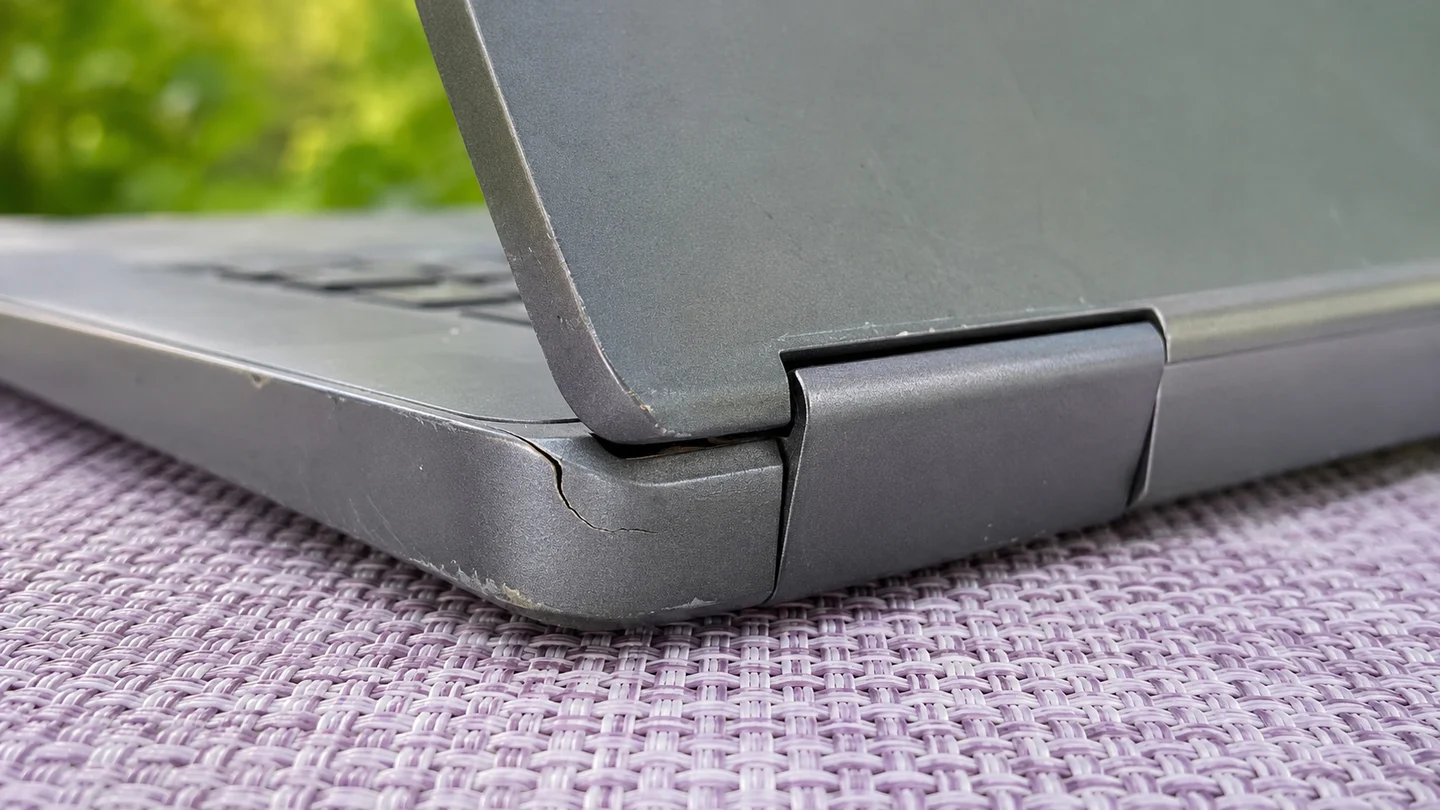
Check that the lid opens normally and look around the hinges and casing. Do not force a stiff hinge or dismantle someone else's machine. Visible damage needs an explanation or competent assessment, not a confident guess that a little glue will fix it.
Confirm what charger is included and whether it is appropriate for the exact model. Observe charging and, where practical and agreed, ordinary use away from the charger. A brief unplugged test cannot establish all-day endurance or the absence of hidden battery problems.
If the casing is distorted or you suspect a damaged battery, pause the purchase and seek qualified assessment. Do not press the casing flat or experiment with opening the battery during a meeting.
Record observations rather than verdicts. 'The left USB port did not detect the agreed device' is useful. 'The whole motherboard is faulty' is a diagnosis you may not be equipped to make.
| Area | Useful observation | What it does not prove |
|---|---|---|
| Keyboard and trackpad | Agreed inputs respond during the test | No intermittent fault will occur later |
| Display | Visible image and any observed defects | Professional colour accuracy |
| Ports and charging | Named accessory works, charging is observed | Every connection or charger is suitable |
| Battery | Behaviour during an agreed ordinary test | Guaranteed runtime or remaining lifespan |
| Hinges and case | Visible condition and normal movement | Internal condition or a repair diagnosis |
Check Windows eligibility separately from whether it starts
Microsoft's Windows 11 requirements include a compatible processor, firmware and security requirements, not only memory and storage. Its guidance provides PC Health Check for Windows 10 upgrade eligibility and distinguishes minimum system requirements from what particular applications may need.
A laptop starting Windows 11 is not, by itself, the eligibility check I would rely on. Ask for the exact hardware and use Microsoft's official guidance for that device. Do not ask a seller to bypass checks or disable protections to make a sale work.
Microsoft lists 14 October 2025 as the end-of-support date for the Windows 10 editions covered by its lifecycle announcement. Check the installed edition and current update arrangement rather than assuming an old Windows installation is a supported long-term plan.
Keep software cost in view too. Ask what operating system and licence are included, and whether the software you need can be used legitimately under the proposed arrangement. An installed application is not automatically a transferable entitlement.
For an ex-office machine, resolve any remaining organisation management or account restrictions through the authorised owner. Do not pay on the promise that a locked or managed device can be sorted out later. If eligibility or access remains uncertain, pause.
Reference Microsoft official Windows 11 requirements and eligibility guidance · Microsoft lifecycle announcement for specified Windows 10 editions
Use manufacturer diagnostics as evidence, not a lifetime guarantee
Dell's official guide explains basic preboot hardware testing and a diagnostic quick test through the F12 boot menu's Diagnostics option. This is a Dell-specific example. Use the exact manufacturer's instructions for the actual machine rather than applying one brand's procedure to every laptop.
Ask the seller to run the appropriate test with you, where available and agreed. Record any reported error and consult the official documentation or a qualified technician. Do not jump from a code to a guessed repair price.
A passed test is useful evidence about the test performed. My buying rule is that it does not replace the everyday checks or prove how a used machine will behave months later. Conversely, a reported error needs resolution before I treat the laptop as ready for work.
You do not need to perform invasive tests, change firmware or install unknown diagnostic downloads during a purchase meeting. If the decision needs deeper assessment, arrange that assessment explicitly or choose a candidate you can evaluate more confidently.
Reference Dell official preboot diagnostics and hardware test instructions
Price the ready-to-use laptop, not the upgrade story
Your complete purchase includes the accepted device price, necessary compatible accessories, any confirmed repair or upgrade work, relevant software costs and collection or delivery. Compare it with a current alternative that can do the same job, not the laptop's historic launch price.
For a proposed RAM, storage or battery upgrade, verify support for the exact model and obtain a relevant quote. Do not assume the part is replaceable, available or cheap. 'You can upgrade it later' is not a costed plan.
Use this simple ceiling: the most you can spend on a usable machine, minus the confirmed essentials it still needs. If the asking price exceeds what remains, negotiate or move on. If the essential work is unquoted, the calculation is unfinished.
The complete-purchase calculator is optional if you want your actual amounts in one place. Do not put a convenient estimate in the repair field just to make the used laptop win.
ShipdeHop takes zero commission, now and always. That does not remove a charger bill or make a fault inexpensive. The saving has to survive the complete purchase, not just the first number in the chat.
Reference ShipdeHop Marketplace complete-cost planning and zero commission
Decide buy, pause or decline before collection
I would move forward when the exact laptop fits the job, the agreed checks are satisfactory, software access is understood and the complete cost is acceptable. I would pause when one important fact is missing. I would decline a purchase that requires me to ignore my own essential requirement.
Use the table before anyone is standing at a collection point. A lower offer does not resolve a device restriction or explain an unknown repair. It only changes the amount attached to the unresolved problem.
If someone else is collecting, the inspection-before-collection guide helps separate observations from technical judgement. Give the collector named checks and a clear instruction to pause on differences. They are not automatically your computer engineer.
Follow the marketplace safety guidance. Aadhaar identity verification helps establish identity, not a laptop's technical condition or future reliability. Keep account passwords, authentication codes and banking secrets private.
| Finding | Decision | Next action |
|---|---|---|
| Meets your needs and agreed checks | Consider buying | Confirm complete terms and handover |
| Essential repair or upgrade has no quote | Pause | Get model-specific assessment and price |
| Model or included items differ | Pause or decline | Reassess the actual offer |
| Unresolved ownership, access or management restriction | Do not complete yet | Have the authorised owner resolve it |
| Cannot do an essential task within budget | Decline | Find a suitable machine instead |
Reference ShipdeHop identity verification and inspection boundaries
Send one useful enquiry, then plan the handover
Try this: 'Please confirm the exact model, processor, RAM, storage and included charger, plus the asking price and known repairs or faults. I need the laptop for [applications and tasks]. Can we agree the checks, any appropriate manufacturer diagnostic and the operating-system and account handover before I decide?'
Then ask how inspection, payment and collection will be completed, and what terms apply if an undisclosed issue appears. A direct sale and a refurbished retailer order need their own actual terms. Do not import a warranty from another listing.
Use the second-hand Marketplace planner to record the device and collection needs. Check current product availability before committing. Website plans are browser-local tools, not live inventory, bookings or payments. Production payment collection and escrow remain disabled.
The point is to leave with a machine you can use for the work you bought it for. A cheap laptop that needs an unplanned second purchase is not much of a bargain.
Reference ShipdeHop current website, app and payment limitations
What does the complete purchase cost?
Change the amounts to match your proposed arrangement. Include every relevant expense.
Questions, answered
Is buying a second-hand laptop worth it in India?
It can be worth considering when the exact machine fits your tasks, condition and software needs, and its complete purchase cost compares well with suitable current alternatives. There is no automatic saving simply because a device is used.
Does Windows 11 already being installed prove compatibility?
Do not rely on that alone. Check the exact hardware against Microsoft's official requirements and the appropriate eligibility process. Operating-system eligibility and the requirements of your applications are separate questions.
What should I check first on a used laptop?
Start with the exact model and configuration, then the functions you need: keyboard, display, ports, charging, audio and camera where relevant. Observe physical condition and agree suitable manufacturer diagnostics. Record missing information before deciding.
Does a passed hardware diagnostic mean the laptop is fault-free?
No. Treat the result as evidence from that test, not a lifetime guarantee or a replacement for everyday checks. Resolve reported errors through the manufacturer's guidance or competent assessment.
Should I buy a laptop that needs a battery or RAM upgrade?
Only after checking that the exact model supports the required work, obtaining a relevant quote and comparing the ready-to-use cost. An unverified upgrade promise is not a budget.
Sources and useful references
External source pages checked on 8 November 2026. The worked amounts are inputs for the decisions explained above.
- Microsoft official Windows 11 requirements and eligibility guidanceChecked 8 November 2026
- Microsoft lifecycle announcement for specified Windows 10 editionsChecked 8 November 2026
- Dell official preboot diagnostics and hardware test instructionsChecked 8 November 2026
- ShipdeHop Marketplace complete-cost planning and zero commissionChecked 8 November 2026
- ShipdeHop identity verification and inspection boundariesChecked 8 November 2026
- ShipdeHop current website, app and payment limitationsChecked 8 November 2026

I’m building ShipdeHop around useful connections between people, journeys and pre-loved things. Zero commission. Now and always.
Why I’m building ShipdeHop →