
Buy a second-hand monitor only after checking the actual screen, the connection you will use and the complete setup cost. Identify the exact model, follow its supported diagnostic procedure, test it with a suitable source and cable, and record unresolved faults. A monitor displaying one attractive picture is not proof that every input, setting or accessory works.
I would not buy a used monitor on the strength of a wallpaper. A bright photograph can make the screen look busy while leaving the useful questions unanswered: does the panel behave normally, does my computer connect properly, and what else must I buy?
This is a domestic India buying guide for a desk display, not a ranking of brands or a professional repair procedure. It applies whether the offer comes from an individual, an office clearance or a refurbisher. A specific listing, current price or working condition is not assumed.
My preferred purchase is a complete usable setup. That means the actual unit, an appropriate power arrangement, the connection you need and a workable collection plan. A cheap screen without those details is still an unfinished purchase.
Start with your computer and task, not the screen diagonal
Write down what you want the display to do: ordinary documents, a second work screen, gaming or another defined task. Record the source device, its actual video output and the resolution and refresh rate you require. Do not pay for a specification you cannot use through your intended connection.
Ask the seller for the exact model number, photographs of the actual unit and its external ports, and a list of included accessories. Check the manufacturer’s manual rather than identifying a model by its casing or screen size.
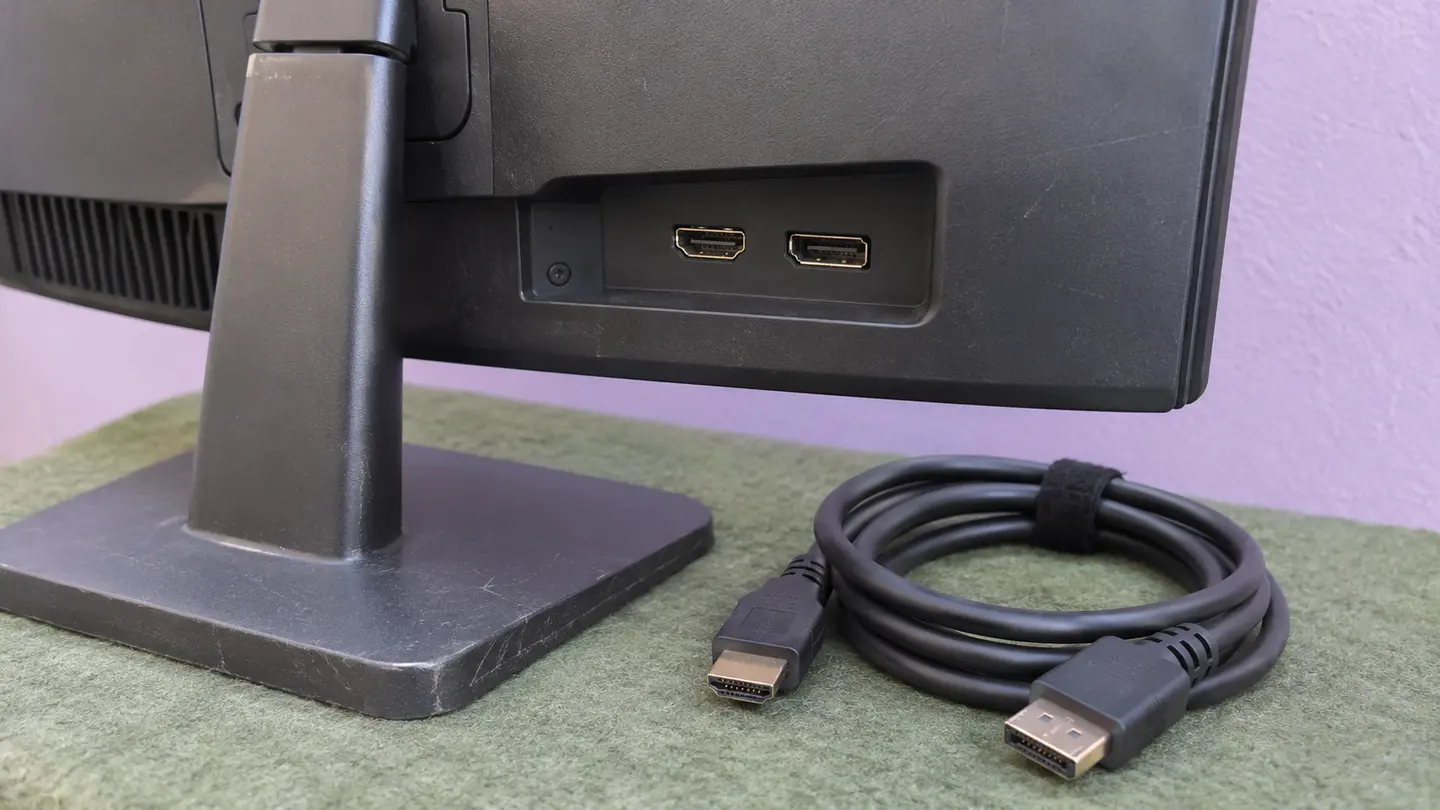
A listing saying USB does not tell you whether that socket supports video input. Likewise, the presence of a connector is not evidence that every desired display mode works through it. Establish the complete source, cable or adapter, input and supported mode before treating an offer as suitable.
For an office clearance, agree which individual monitor you are buying. If several units share a model name, the seller should not substitute another untested unit when someone comes to collect.
Separate a panel check from a connected-computer check
Dell’s diagnostic guidance, reopened on 19 November 2026, distinguishes a self-test feature check from built-in diagnostics. It directs users to the exact monitor’s manual and uses diagnostics to help identify whether a display abnormality originates in the monitor.
Samsung India’s blank-display guidance, also reopened on 19 November, checks power, cable connections and selected source before describing self diagnosis. It cautions that functions can vary by model or region. These are manufacturer troubleshooting paths, not a universal button sequence.
The buying lesson is narrower than a promise of perfect hardware. First establish what the monitor can demonstrate independently using supported instructions. Then establish what happens with the computer and connection you intend to use. One path does not replace the other.
Ask the seller to allow the appropriate checks before payment. If a model lacks a particular self-test, use its documented alternatives and record the limitation. Do not invent a test result just because a menu option was unavailable.
Reference Dell India: self-test feature check and model-specific built-in diagnostics · Samsung India: blank-display checks, source selection and model-dependent self diagnosis
Use an observation-to-decision table
This table is my purchasing framework, not a diagnostic certification. Follow the manufacturer’s instructions and stop if there is obvious damage, a damaged power lead or another reason the equipment should not be operated.
Record the exact observation and configuration. There is a large difference between worked on HDMI with the supplied cable and everything works. The first statement can be checked. The second frequently contains a generous quantity of optimism.
| Observation | What it establishes | Next buying decision |
|---|---|---|
| Supported standalone test appears normal | That test did not show the reported abnormality | Still test your complete source and input path |
| Abnormality remains in supported diagnostics | The monitor needs further assessment | Seek competent service advice or reject the offer |
| One connected source works | That source, cable and input worked in that setup | Check the input and mode you actually require |
| No picture with your computer | An unresolved connection or hardware problem | Resolve it before describing the setup as usable |
| A required input is not tested | No evidence for that function | Arrange a test or treat the requirement as unmet |
| Visible panel or stand damage | A disclosed condition issue | Assess suitability and any necessary service first |
Reference Dell India: self-test feature check and model-specific built-in diagnostics · Samsung India: blank-display checks, source selection and model-dependent self diagnosis
Inspect the screen without turning the visit into a repair job
With the seller, inspect the actual panel in ordinary viewing conditions and use the model’s supported checks. Look for visible cracks, pressure marks, lines, bright or dark spots, uneven appearance or intermittent behaviour. Ask to view more than the seller’s chosen photograph.
Distinguish your observations from a technical diagnosis. A mark seen in a phone photograph may not describe how the screen looks to your eyes. Conversely, a camera recording is not a reliable certificate that no display issue exists.
If a dot or another fault matters to your work, resolve it before buying. Do not assume that a manufacturer’s pixel policy guarantees repair or replacement for this second-hand transaction. Eligibility and applicable terms require separate confirmation.
Do not press or rub a suspected pixel, open the housing or try internet repair tricks at the handoff. A buying decision does not require you to become the repair department. If a necessary fault cannot be assessed, leave it unresolved rather than promising yourself an easy fix.
Test the complete connection you will use at home
Where practical, bring the intended source device and a suitable known-working cable. Follow the relevant equipment instructions when connecting them. Establish the selected input and an appropriate supported display mode, then try the ordinary task that matters to you.
For a second work screen, that can include checking that your intended desktop arrangement works and text is usable at the chosen settings. For another task, test its actual requirements. A menu showing a specification does not demonstrate every application or every adapter chain.
A seller’s different computer may be useful for isolating a problem, but it does not settle compatibility with yours. If your source cannot be tested, verify specifications carefully and agree what remains unknown before committing.
Ask about intermittent issues and repair history. A short demonstration cannot establish remaining lifespan. Do not convert a clean test today into a claim that the screen will work for a particular number of years.
Inventory the stand, power supply and other included hardware
Photograph the exact included parts: monitor, stand and base, appropriate power cable or adapter, video cable and any other agreed accessory. Check the manual for the required power arrangement. Some models use an external adapter and others do not.
A plug that physically fits is not enough to establish electrical compatibility. Use the manufacturer’s specified supply and obtain appropriate advice if the supplied adapter is unidentified or questionable. Do not power a monitor with an improvised alternative to complete a sale.
Check whether the stand is secure and whether its intended adjustments work normally. If you plan to use another mount, confirm compatibility for the exact model and mount before buying. Include any required mounting hardware in the budget.
Treat missing parts as named requirements, not small details to fix later. A bare panel can become a sensible purchase only when the necessary accessories, their suitability and their cost are established.
Compare the complete ready-to-use cost in INR
Use one worksheet for each offer. Add the agreed price of the exact monitor, required compatible accessories, necessary service and collection costs. Keep optional improvements separate so you can see what is required to make the purchase usable.
The complete purchase calculator can help organise your own verified amounts. It does not obtain current quotes or validate electrical compatibility. Replace examples with the amounts relevant to your transaction.
Do not enter zero for an unknown repair. If a fault must be fixed before the display can do its intended job, obtain an appropriate assessment and quote or set that offer aside. A discount is not evidence of repair feasibility.
Compare equivalent outcomes. A tested monitor with stand and suitable power supply is not the same offer as an untested panel with unspecified accessories. Differences in support and collection responsibility belong beside the totals, not hidden beneath them.
| Cost or condition | Record for this offer | Resolve before commitment |
|---|---|---|
| Exact monitor price | Agreed INR amount and included unit | Substitution or unclear accessories |
| Required connection | Compatible cable or adapter and its quote | An assumed video function |
| Power and stand | Specified supply, stable stand or suitable mount | Unidentified power adapter |
| Necessary service | Feasibility, provider and verified quote | A repair guessed from a listing |
| Collection and protection | Both addresses, access and handling scope | Transport without suitable protection |
| Support | Who promises what, with written terms | Unverified warranty or return claim |
A student’s second-screen purchase shows why the total changes
Imagine a student in Pune comparing two used monitors for a laptop. This is a planning example, not a customer story. One offer includes a stand and a demonstrated connection. The other is a bare panel with a lower asking price and an untested input.
First, the student confirms what the laptop can output and what each exact monitor accepts. If the cheaper option cannot provide the required setup, its asking price is irrelevant. An inexpensive mismatch is still a mismatch.
Next, the student lists the missing stand or mount, suitable power supply, connection hardware and collection requirements. No invented prices are needed. The useful work is obtaining the actual answers and quotes.
Finally, the student compares support. A reseller’s written return promise and an individual’s as-is offer are not automatically equivalent. Neither should be assumed to include manufacturer warranty. The appropriate choice may be either tested offer or neither offer if the gaps remain.
Keep inspection and collection as separate responsibilities
Agree who checks the monitor and who decides whether the observed condition is acceptable. A person collecting an already approved item is not automatically qualified to diagnose a screen, approve an adapter or decide whether the picture suits your work.
The monitor inspection guide is a useful starting point for an item-specific handoff record. Record the model, included parts, completed tests, unresolved issues and visible condition before arranging protection and transport.
Follow the manufacturer’s handling instructions and the selected carrier’s requirements. Protect the display appropriately and do not treat a blanket or fragile sticker as a complete packing specification. If safe preparation or suitable capacity is uncertain, choose a more appropriate transport arrangement.
ShipdeHop is India’s people-powered super app for peer-to-peer buying and selling, shared journeys and related exchanges. Explore Marketplace for the purchase context. Any traveller arrangement still needs a disclosed item, suitable capacity and agreed handoffs.
The current availability page says website tools do not create live listings, matching, bookings or payments. It links the iPhone app, while a public Android listing remains unverified. ShipdeHop takes zero platform commission, does not collect in-app payments and offers no live escrow. Check the actual app for a particular arrangement.
I would finish with a written sentence: this exact unit, these included parts, these checks completed, these questions outstanding and this complete cost. That is less exciting than a large discount badge. It is also more useful when the monitor reaches your desk.
Reference ShipdeHop current product availability, domestic scope and payment limitations
What does the complete purchase cost?
Change the amounts to match your proposed arrangement. Include every relevant expense.
Questions, answered
Is it worth buying a second-hand monitor?
Consider it when the exact unit meets your task, its panel and required connection have been checked, included hardware is suitable and its complete ready-to-use cost fits your budget. There is no universal discount that makes an untested monitor worthwhile.
How do I test a used monitor before buying?
Identify the model, follow its supported diagnostics and safety instructions, inspect visible condition, and test the source, cable, input and display mode you will use. Record which checks were completed rather than declaring every function tested.
Does a successful self-test prove my laptop will work with it?
No. A supported standalone check and your complete computer-to-monitor connection answer different questions. Test the actual connection or verify its documented requirements and agree any remaining uncertainty.
Should I accept a monitor with a visible pixel defect?
Decide based on the actual observation and your requirements, not a promise that it will disappear. Verify any claimed warranty remedy separately. Do not press the panel or attempt a repair during the handoff.
What should be included in the used-monitor budget?
The exact unit price, required suitable power and connection hardware, stand or mount, necessary service, protection and collection. List unresolved costs explicitly instead of treating them as zero.
Sources and useful references
External source pages checked on 19 November 2026. The worked amounts are inputs for the decisions explained above.
- Dell India: self-test feature check and model-specific built-in diagnosticsChecked 19 November 2026
- Samsung India: blank-display checks, source selection and model-dependent self diagnosisChecked 19 November 2026
- ShipdeHop current product availability, domestic scope and payment limitationsChecked 19 November 2026

I’m building ShipdeHop around useful connections between people, journeys and pre-loved things. Zero commission. Now and always.
Why I’m building ShipdeHop →